
也找不到中国客服,有谁知道原因的大神吗?
工单节点使用指南
• 请用平和的语言准确描述你所遇到的问题
• 厂商的技术支持和你一样也是有喜怒哀乐的普通人类,尊重是相互的
• 如果是关于 V2EX 本身的问题反馈,请使用 反馈 节点
This topic created in 2616 days ago, the information mentioned may be changed or developed.
 |
airylandSep 9, 2019 via iPhone
1
目测是被墙
|
 |
loveSep 9, 2019
2
翻墙可以,应该是被认证了
|
 |
fuxiaoheiSep 9, 2019
3
DNS 污染
|
 |
morethanseanSep 9, 2019
6
@haimall #5
中国地区 isp 解析有问题,官方说正在修复... |
 |
7
@morethansean 明白了,不耽误我们司国庆会议就行 😁😁😁
|
 |
locatelliSep 9, 2019
8
status 页面上说还在调查,谁知道啥问题
|
 |
CipoolSep 9, 2019 via Android
9
明显的 DNS 污染症状,用国外的公共 DNS 解析 IP 也返回污染过的错误结果,应该不是运营商的问题
|

 |
liubiantaoSep 9, 2019
12
@haimall #7 你还指望不耽误国庆会议?今年国庆肯定是最严的一年,马上大批 XX 软件都不能用了,今早想办法吧
|
 |
panbofengSep 9, 2019
13
牛逼,绝大部分用 Zoom 的人也就是有国际会议往来的人,尤其是外企,这属于宁愿牺牲经济吧。
|
 |
Raymon111111Sep 9, 2019
14
自己用梯子
|
|
15
@Raymon111111 不是我一个人用的问题,还有一批老人。
|
 |
miaomiao888Sep 9, 2019
17
难不成是因某个泼水健身达人在上面直播的关系?
|
 |
niaorenSep 9, 2019
18
@miaomiao888 这玩意可以直播?求科普
|
|
niaorenSep 9, 2019
19
我感觉是国庆到来。严打了一波 误伤的.. 好像用的是 aws
不过 zoom 要在国内放服务器,提高可用性才行,人在屋檐下不得不低头 |
|
locatelliSep 10, 2019
21
|

 |
SharuruSep 10, 2019
23
还好有 TeamViewer 可以用一下。
|

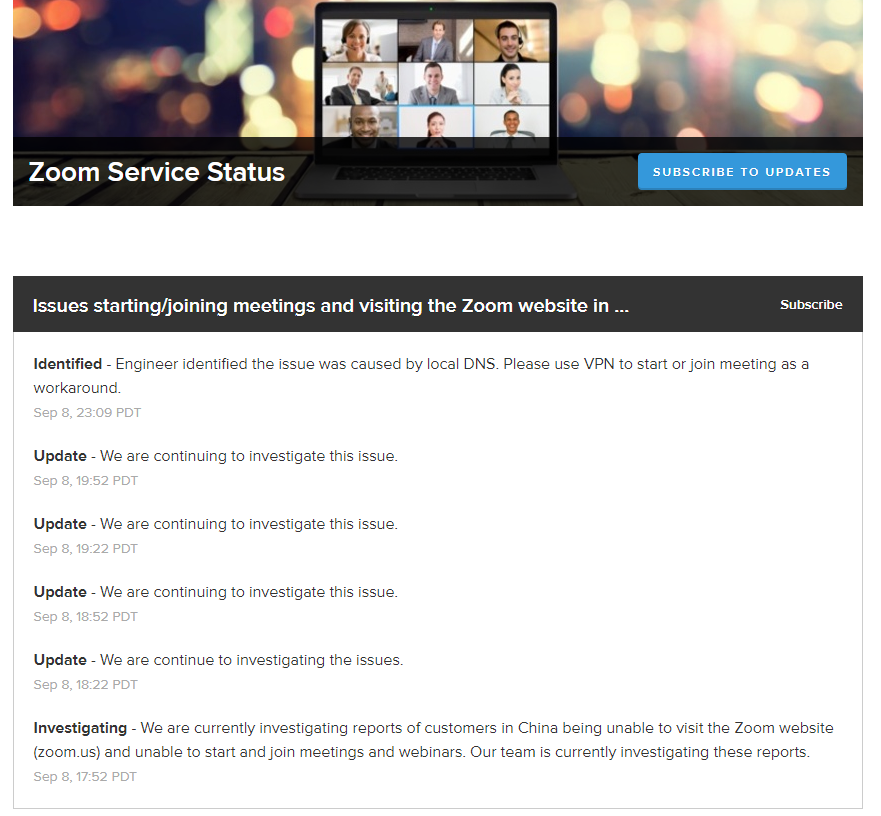
 |
ranger13dSep 10, 2019
25
有人试过华万了吗,什么报价?
|
 |
28
@ranger13d 3800 一年的等同 149 美金一年的那个,但是没有云录制。说提供美国 zoom 的小票还给补剩余的时间。但是需要深度卸载以前的 zoom 软件,还得手动删个表,用户承受不起这操作啊。。。。
|
 1
 |
axinggSep 10, 2019
29
dns 污染,随机解析为 Facebook,twitter 等被墙网站 ip。外企国内办公室一堆人要用这个,头疼
|
 |
30
@ranger13d 刚问过,按参会人数分 10、25、50、100 四档,一年价格分别为 3800、5800、9800、9800 (半价)
|
 |
dennissoftSep 11, 2019
31
我这边用 SimpleDNSCrypt 貌似可以解决这个问题。
|
|
ranger13dSep 11, 2019
32
@brickggg @inetfuture 降维式抢钱惹不起。。
|
 |
zvhddSep 11, 2019
33
客户端连夜升级之后,暂时能通过输入会议号的方式加入会议了
|
 |
MoveItOnSep 11, 2019
34
用 Webex, 价格高点,没毛病。
|
 |
cnlsrootSep 12, 2019
39
@ranger13d 网址可以打开,但是客户端无法使用呀,国内封杀 这是在给 VPN 拉客户吗?保护毛线国内市场 求 VPN 我计划给公司人人安装一个 VPN 客户端 来使用 ZOOM
|
|
ranger13dSep 17, 2019
40
今天收到 zoom 的邮件
Customers in China: Our team has developed a workaround that will allow users to only join Zoom meetings, but will not allow them to sign in, start meetings, or have access to chat from China. Please follow the instructions below: Zoom Desktop Client: Please join meetings by downloading the client from: https://zoomcloud.cn/download.html Zoom Web Client Direct web client link that can be added to your invitations: http://zoomus.cn/webclient/[insertMeetingID]/join iOS client (The below steps require the system language set to Chinese.): 1. Download Zoom Cloud Meetings App off of App Store 2. Switch the system language to Chinese. 3. Logout of your current Zoom account. If you have not yet logged in, please ignore this step. 4. Tap the "Sign In" button, located on the bottom right of the Zoom app and enter an invalid Username and Password (for example "u" and "p"). Then tap "Sign in"** 5. Ignore the error message that appears by tapping "OK". 6. Tap "Cancel" on the top left of the app when prompted. This will return you to the home page of the Zoom app. 7. If prompted to save your password, please select "Not now". 8. Once steps 1-7 have been completed, feel free to switch back to your preferred system language. 9. Tap "Join a Meeting" to enter meeting number and Display name, and join a Zoom meeting. **Please note not to enter invalid credentials under any other system language on the device. 还没试过,有需要的可以试试看 |

|
45
安卓更新了 4.5.5 手机验证后 可以使用了。
|
 |
MarkWallFeb 21, 2021
48
找有虚拟网卡的[梯子]( https://wall101.com/tizi)比较方便。要是一直开全局模式也是很不稳定,容易断开
|
 Select Language